
Yes, a photo with data hidden in it can often be detected, but detection usually means learning that something was added, not reading what it is. Whether it is found depends on three things: the method used to hide it, who is looking, and what tools they bring. A person scrolling a gallery sees a picture. An automated scanner sees statistics and raises many false alarms. A trained examiner with forensic tools can usually tell that a file carries more than its picture, and still cannot read encrypted contents without the password.
This guide explains what each of those lookers can see, what the best-known field study found when it scanned two million images, and why a clean scan proves as little as a flagged one.
Detection happens at three levels
It helps to separate the people who might look, because each one sees something different.
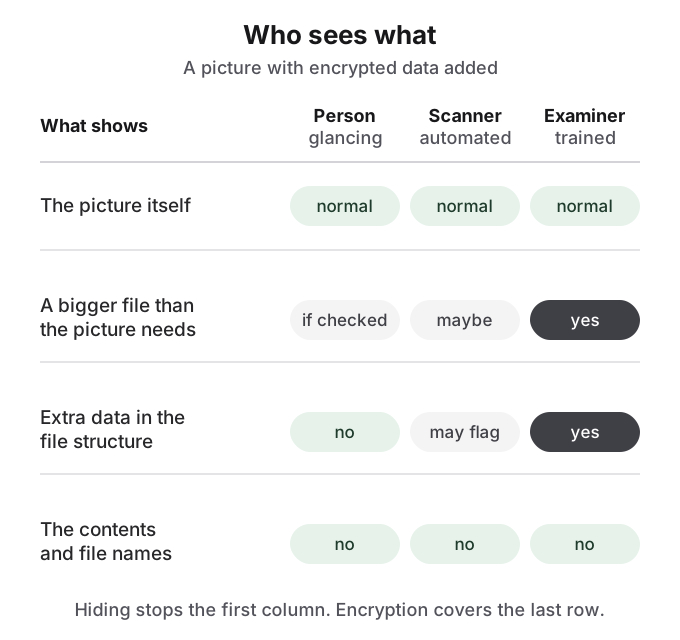
A person glancing at your phone or laptop sees thumbnails. Steganography of any kind defeats this looker completely, because the picture looks the same. The only tell they might catch is size: a phone photo that takes up hundreds of megabytes in a file browser looks odd. A commenter in r/privacy made the point with a picture "miraculously taking up 12gb of data".
An automated scanner runs statistical tests or format checks over many files and flags the unusual ones. It never reads contents, and it trades misses against false alarms. As one Hacker News commenter put it, detector thresholds have to be tuned so they "don't give too many false positives to make them useless. And they're not magic."
A trained examiner works one device or file at a time, with time and a full toolkit. They can usually tell that a file contains data beyond the image. Reading it is a separate problem, and with strong encryption and a good password it is the problem they cannot solve.
Statistical steganalysis looks for disturbed noise
True steganography changes the image data itself, most often the lowest bit of pixel values or of JPEG coefficients. The change is invisible, but natural photos have a characteristic noise pattern in those bits, and encrypted data, which looks perfectly random, disturbs it. Steganalysis, in Wikipedia's summary, is "generally handled with statistical analysis", ideally comparing a suspect file against unmodified ones "from the same source (for example, the same model of digital camera)".
The research history is a race. Statistical attacks on simple LSB embedding were published in 2000 and 2001. Tools that preserved simple statistics followed, and attacks on higher-order statistics followed them; OutGuess's JPEG method, for instance, was broken by a 2002 blockiness attack. Since 2012 the state of the art has been machine-learning classifiers trained on thousands of image features. Practitioners describe both ends: naive LSB replacement is "VERY easy to detect", in one Hacker News commenter's words, while another points to a "whole body of work that focus on statistically undetectable data hiding". Both are true. What decides it is the algorithm and the amount of data hidden.
One case is trivially easy. If the analyst has the original photo, comparing the two files reveals any change at once. A Reddit user in r/Steganography who posted 100 images as a "break my method" challenge found that out quickly: the top reply located the public dataset the images came from, compared them, and found LSB changes on the blue channel.
File size and structure give away most practical hiding
Most "file hidden in a picture" methods in everyday use are not statistical at all. They append data after the image's end marker, or add extra blocks that the file format allows. How steganography works explains each method in detail. These approaches hold far more data and keep the picture pixel-perfect, but they leave plain structural tells: the file is larger than an image of its dimensions and quality should be, and a program that reads the whole file finds content that the image does not need.
A general forensic workflow for any suspect file starts with this kind of plain inspection, not with exotic statistics. Practitioners on r/computerforensics describe learning what a normal file of that format looks like, checking the start and end of the file, extracting readable text, listing the file's internal structure, carving out any embedded files by their signatures, and measuring entropy, since encrypted or compressed data scores as near-random. Only after that do they run format-specific detectors. Appended data shows up in seconds. Encrypted data shows up as a block of noise that cannot be read.
Two million images, about 17,000 flags, zero messages
The best-known attempt to measure real-world steganography is Niels Provos and Peter Honeyman's 2001 study. They downloaded two million images from eBay auctions and ran their JPEG detector, Stegdetect, over all of them. It flagged about 17,000 images, roughly 0.85 percent. They then ran a distributed dictionary attack on the flagged images and recovered nothing: "We have analyzed two million images downloaded from eBay auctions but have not been able to find a single hidden message."
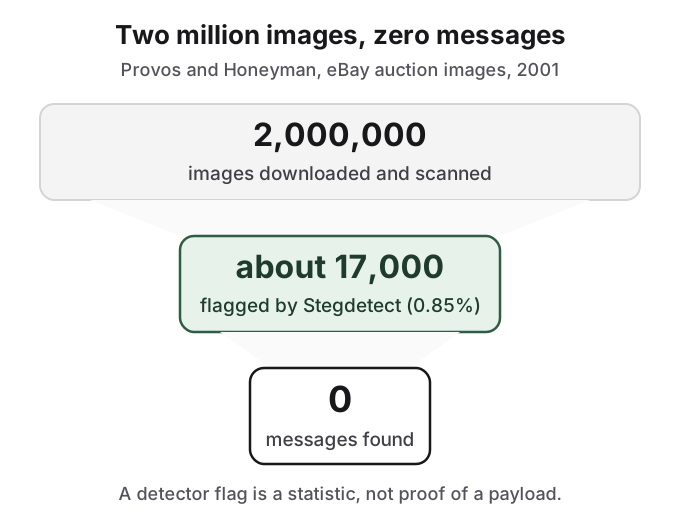
Two lessons survive the study's age. First, flags are cheap and mostly wrong, which is why Wikipedia's steganalysis article calls acting on detector output alone "a very dicey proposition unless a payload has been completely recovered and decrypted". Second, detection and recovery are different steps; recovery needs the password. The numbers are a 2001 snapshot of JPEG tools on auction photos, not a current detection rate, and no comparable recent figure exists for appended or inserted data. A 2012 Reddit commenter in r/computerforensics described a similar personal project, "scanned millions of images and discovered about 200" flagged, and brute-forced six of them.
A clean scan does not prove a file is clean
Detectors miss too. On r/computerforensics, a user testing several detectors against an image they had made with steghide, which encrypts and spreads its payload, reported: "None of these tool found anything." Stegdetect itself is no longer developed. The absence of a hit is a statement about that tool and that method, not proof that nothing is there.
The same thread is a useful reality check on how often anyone looks. Forensic practitioners there describe image steganography as common in capture-the-flag puzzles and rare in casework: "In a CTF? Lots! Real life? Not as much as you would think." That is not a reason to assume nobody will look. It is a reason not to build a privacy plan on the hope that hiding alone will hold.
What this means for a hidden photo on your phone
Put together, the honest answer for everyday photo hiding is this. Against people who use or borrow your device, a cover file that looks like an ordinary photo works, because they see the picture and nothing else. Against a purpose-built tool or a trained examiner, assume the hidden data will be noticed, and rely on encryption and a strong password to keep the contents private. Against someone who can legally compel you to hand over that password, neither hiding nor encryption is a defence, and carrying less data is the only safe advice.
How HideFile can help
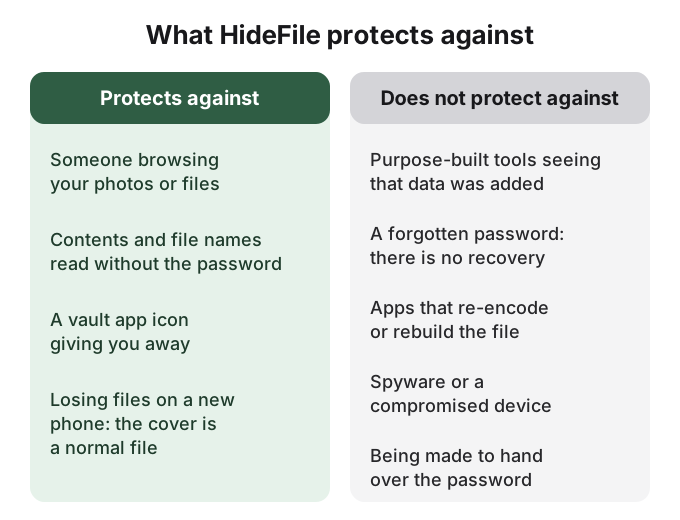
HideFile, at hidefile.app in any modern browser, puts private photos and files inside an ordinary photo, video or PDF and encrypts them with your password in the browser. Files are not uploaded to a HideFile server. The cover opens as a normal file in Photos, a video player or a PDF reader, so the person glancing at your gallery sees what they expect.
We state the limit plainly because this page is about it: HideFile stops casual snooping, not forensic tools. It does not alter pixels or try to fool statistical tests. A purpose-built tool can tell that data was added to the cover; the contents stay encrypted and unreadable without the password. There is no password recovery. Apps that re-encode photos can strip the hidden part, so keep and share the cover as a file. It is the wrong tool for border searches, trained examiners or legal pressure.
For the tools on both sides of this question, see steganography tools. For simpler tricks and what each one fools, see how to hide files in plain sight. For how vault apps compare, see is a photo vault app safe.
Sources
- Provos and Honeyman, Detecting Steganographic Content on the Internet, CITI Technical Report 01-11, 2001 (read 2026-10-14)
- Wikipedia: Steganalysis and Steganography (checked 2026-10-14)
- Wikipedia: OutGuess (checked 2026-10-14)
- Kodovsky, Fridrich and Holub, "Ensemble Classifiers for Steganalysis of Digital Media", IEEE TIFS, 2012, doi:10.1109/tifs.2011.2175919
- Fridrich, Goljan and Du, "Detecting LSB steganography in color and gray-scale images", IEEE Multimedia, 2001, doi:10.1109/93.959097
- Reddit, r/computerforensics: Is there any tool to identify steganography?
- Reddit, r/computerforensics: Hidden files in jpeg images?
- Reddit, r/computerforensics: Does digital steganography actually see use in the real world?
- Reddit, r/Steganography: Can you break my steganography method?
- Reddit, r/privacy: Steganography - How to Hide Data from the Feds
- Hacker News: comment on detector thresholds
- Hacker News: comment on naive LSB detection
- Hacker News: comment on statistically undetectable hiding