
Steganography is the practice of hiding a message so that nobody suspects a message exists. Encryption scrambles a message so it cannot be read; steganography tucks it inside something ordinary, such as a holiday photo or a voice memo, so that nobody thinks to look. The word comes from the Greek for "covered writing".
Digital steganography is mostly about pictures, because a photo holds millions of numbers that can be nudged without anyone seeing a difference. This guide explains the methods that actually exist, from changing the last bit of a pixel to working inside JPEG compression, why most "file hidden in a picture" tricks are something simpler than true steganography, why sending a photo through a messaging app often wipes the hidden part, and what the people who look for hidden data, called steganalysts, do.
What is steganography
Every steganographic system has the same three parts. The payload is the secret: a message, a file, a folder. The carrier, also called the cover, is the innocent file that holds it: a PNG, a JPEG, a WAV recording. The result, the carrier with the payload inside, is called the stego file or package. Wikipedia's article on the subject adds a useful fourth term, encoding density: the share of the carrier that was changed. The lower the density, the harder the change is to notice, and the less data fits.
The advantage over encryption, in Wikipedia's words, is that the secret "does not attract attention to itself as an object of scrutiny". An encrypted file announces that something is being protected. A photo of a dog announces nothing. That is also the weakness: once someone does suspect the photo, steganography on its own protects nothing, which is why serious tools encrypt the payload first and hide it second. The hiding buys obscurity. The encryption is what keeps the contents safe when the obscurity fails.
The idea is 2,500 years older than the computer
The oldest stories are physical. Herodotus describes a message tattooed on the shaved head of a messenger, sent once the hair had grown back. Later centuries used invisible inks that appear with heat, and in the twentieth century microdots shrank a page of text to the size of a printed full stop. The word itself first appears in 1499, in Johannes Trithemius's Steganographia, a treatise on cryptography and steganography disguised as a book on magic.
The digital version keeps the same logic and swaps the scalp for a file format. A carrier only needs two properties: some part of it can change without a human noticing, and a program that knows where to look can read the change back. Images have both in abundance.
LSB steganography changes the last bit of each colour
The textbook method is least significant bit (LSB) embedding. A pixel in a typical image stores red, green and blue as numbers from 0 to 255, each written as eight bits. The last bit is worth exactly one step. Flip it and a red value of 200 becomes 201. No screen and no eye can show that difference.
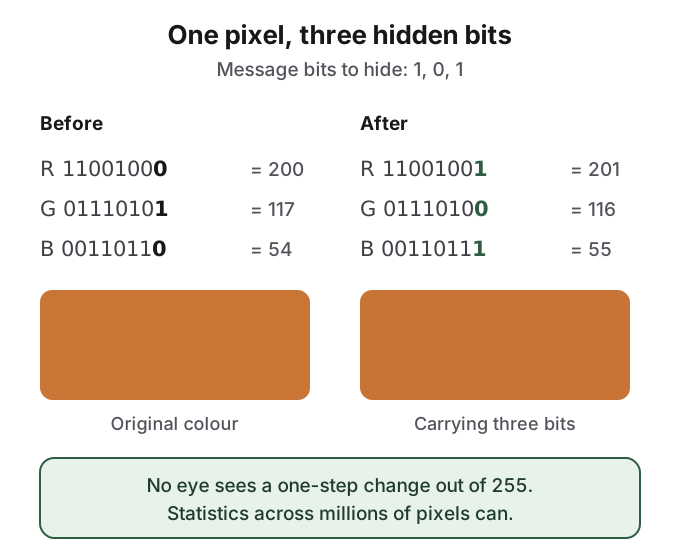
Repeat that across every value in the picture and the capacity adds up. A 12-megapixel photo has 36 million colour values, so one bit each is 36 million bits, about 4.5 MB in theory. Real tools use far less, both to stay quiet and because they scatter the bits in a pseudo-random order derived from a password, so the payload is not a neat block at the top of the image.
LSB works only on lossless formats such as PNG and BMP, where every pixel value is stored exactly. Save the same image as a JPEG and the compressor rounds the values, scrambling the last bits and the message with them.
It is also the method steganalysts understand best. Natural photos have a characteristic noise pattern in their low bits, and overwriting those bits with encrypted data, which looks perfectly random, changes the pattern. Westfeld and Pfitzmann published a statistical attack on LSB embedding in 2000, and Fridrich, Goljan and Du showed in 2001 that, in colour images, embedding increases the number of pairs of "very close" colours. Wikipedia reports that LSB-only changes can be detected "in some cases detecting encoding densities as low as 1% with reasonable reliability", though that figure is unreferenced there. On Hacker News, a commenter put it more bluntly: the noise introduced by naive LSB replacement is "VERY easy to detect".
JPEG steganography works inside the compression
Most photos on phones and the web are JPEGs, so tools had to find a way to survive JPEG's rounding. The answer is to hide data after the rounding instead of before it.
A JPEG encoder cuts the image into 8 by 8 pixel blocks and converts each block into 64 frequency coefficients with a transform called the discrete cosine transform (DCT): one number for the block's average brightness, others for coarse and fine detail. It then divides those coefficients by a quality table and rounds them, which is where the loss happens. JPEG steganography edits the rounded coefficients themselves, so nothing the encoder does afterwards rounds the message away.
The early tools did this naively. JSteg and JPHide, two of the programs Provos and Honeyman tested for in 2001, change the low bits of coefficients in ways that shift their overall histogram, which statistical tests catch. OutGuess, written by Niels Provos in 1999, embeds bits in pseudo-random coefficients and then adjusts others so the global histogram matches the original, specifically to defeat the chi-square attack.
It did not last: a 2002 attack by Fridrich, Goljan and Hogea measured "blockiness" across JPEG block edges and broke OutGuess, even estimating how long the hidden message was. steghide, the best-known command-line tool, takes a different route for JPEG and audio: it swaps pairs of values chosen with the passphrase, so that the counts of each colour or sample stay the same, which its authors describe as resistant to "first-order statistical tests".
That arms race is still the shape of the field. Fridrich, Pevny and Kodovsky called statistically undetectable JPEG steganography a research problem full of "dead ends" in 2007, and by 2012 steganalysis had moved to machine-learning classifiers trained on thousands of image features. Both statements a reader will find online, that steganography is "easy to detect" and that it is "hard to detect", are true. The dividing line is the algorithm, not the idea.
Most "file hidden in a picture" is appended data, not true steganography
Search YouTube for how to hide a file inside an image and the most common demonstration is not LSB at all. It is a one-line command on Windows:
- Put a photo and a zip archive in the same folder.
- Run
copy /b photo.jpg + archive.zip combined.jpgin Command Prompt. On macOS or Linux,cat photo.jpg archive.zip > combined.jpgdoes the same. - Open
combined.jpg: it shows the photo. Rename it to.zipand many archive tools open the files.
This works because of how formats end. A JPEG finishes with an end-of-image marker and a PNG with a chunk called IEND, which the PNG specification defines as "the last chunk in a PNG datastream". Image viewers stop reading there and ignore anything after it. Zip readers, by contrast, look for the archive's directory at the end of the file and work backwards. A file that two different programs each read as valid is called a polyglot, and the "old RAR trick", as one Reddit user in r/Steganography called it, is the most common example.
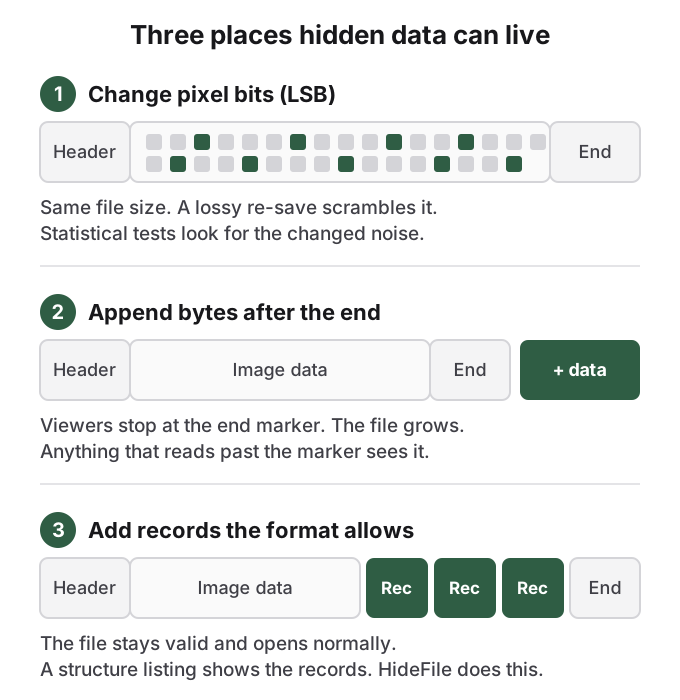
A third family sits between the two. Most formats are containers of labelled blocks and define a way to add custom ones: PNG has ancillary chunks, JPEG has application segments, MP4 has user-defined boxes, PDF allows comments. A viewer that does not recognise a block skips it, so the file stays fully valid and opens normally everywhere. Capacity is large, gigabytes in a video, and nothing in the picture changes.
None of these last two is steganography in the strict sense, because neither touches the pixels or tries to look statistically normal. The file simply carries more than its picture needs. The most upvoted post in a recent sample of r/Steganography hid data in the padding bytes of BMP scan lines, and its own commenters spotted the tells: one did the arithmetic on capacity, another said they would "be immediately suspicious if someone sent me an image that's not png or jpg". Appended and inserted data hides from a person looking at the picture. It does not hide from a program that reads the whole file, and the file is visibly larger than an ordinary photo of the same size.
Sharing a photo often destroys the payload
Hidden data only survives if the exact bytes survive, and many of the ways people share photos do not keep them.
When a messaging app, social network or image host receives a photo, it often does not store the file you sent. It decodes the image into pixels, frequently resizes it, and writes a brand new compressed file to save bandwidth. LSB bits in the pixels are scrambled by the new compression. Coefficient-level JPEG payloads are rounded away when the quality changes. Appended bytes and extra format records are generally not copied, because the app writes the new file from the pixels alone.
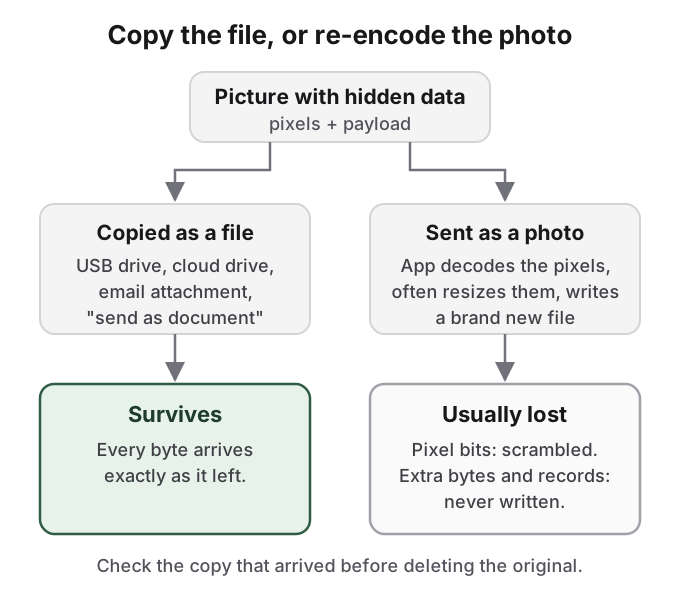
There is no solid public test of which apps do this today, and behaviour changes between versions and between "photo" and "document" sending modes, so treat any share as lossy until proven otherwise. The anecdotes all point the same way. A Reddit user in r/Steganography found that a tool's payload survived only in the PNG download from Reddit, not in the WebP version Reddit serves. A Hacker News commenter recalled an earlier attempt where "most image hosts were smart enough to detect the sub-optimal encoding and 'helpfully' fix it". The safe habit is simple: send the file as a file, then check that the copy which arrived still opens before deleting the original.
Steganalysis is the craft of finding hidden data
Wikipedia defines steganalysis as "the study of detecting messages hidden using steganography", the counterpart of cryptanalysis. Its goals come in three steps: spot suspicious files, decide whether they carry a payload, and recover it if possible. The first two are statistics and file inspection. The third usually needs the password, which is why encryption matters even after the hiding has been seen through.
The best-known field study shows how hard the third step is in practice. In 2001 Niels Provos and Peter Honeyman scanned two million images from eBay auctions. Their detector flagged about 17,000, and a dictionary attack on those found no hidden message at all. Wikipedia's article warns that acting on steganalysis alone is "a very dicey proposition unless a payload has been completely recovered and decrypted", because otherwise the analyst only has "a statistic indicating that a file may have been modified". The full story of what detection looks like, and its limits, is in can hidden photos be detected. The tools on both sides, with their ages and weak spots, are compared in steganography tools.
How HideFile can help
Most people who search for steganography do not need a covert channel. They want a few private photos or files to stop being obvious on a phone or laptop that other people pick up. For that job, the classic tools are awkward: steghide holds small payloads in JPEG and WAV, LSB tools need PNG, and none of them gives you a gallery you can browse.
HideFile takes the third approach from the diagram above. At hidefile.app, in any modern browser, you choose an ordinary photo, video or PDF as a cover, add your private files, and set a password. HideFile encrypts the files in the browser and stores them as records the file format allows, so the cover still opens as a normal picture, video or document everywhere else. Open it at hidefile.app with the password and the files appear. Nothing is uploaded to a HideFile server, and there is nothing to install.
It is concealment plus encryption, and it is honest about which part does the work. HideFile does not change pixels or try to fool statistical tests. A purpose-built tool can tell that data was added to the cover; what it cannot do is read the contents without the password. That makes it a fit for keeping things away from people browsing your devices, and the wrong tool for a trained examiner, a border search or legal pressure.
There is no password recovery, and apps that re-encode photos can strip the hidden part, so keep and share the cover as a file. For the full picture of what different hiding tricks fool, see how to hide files in plain sight, and for how photo vault apps compare, is a photo vault app safe.
Sources
- Wikipedia: Steganography (revision of 2026-10-13, checked 2026-10-14)
- Wikipedia: Steganalysis (checked 2026-10-14)
- Wikipedia: OutGuess (checked 2026-10-14)
- Provos and Honeyman, Detecting Steganographic Content on the Internet, CITI Technical Report 01-11, 2001
- Westfeld and Pfitzmann, "Attacks on Steganographic Systems", Information Hiding (LNCS), 2000, doi:10.1007/10719724_5
- Fridrich, Goljan and Du, "Detecting LSB steganography in color and gray-scale images", IEEE Multimedia, 2001, doi:10.1109/93.959097
- Fridrich, Pevny and Kodovsky, "Statistically undetectable JPEG steganography: dead ends, challenges, and opportunities", ACM MM&Sec 2007, doi:10.1145/1288869.1288872
- Fridrich and Kodovsky, "Rich Models for Steganalysis of Digital Images", IEEE TIFS, 2012, doi:10.1109/tifs.2012.2190402
- W3C: PNG Specification (Third Edition), IEND chunk
- steghide: project home
- Microsoft Learn: copy command
- Reddit, r/Steganography: hiding .txt files in images?
- Reddit, r/Steganography: BMP scan-line padding post
- Reddit, r/Steganography: PNG download keeps the data, WebP does not
- Hacker News: comment on naive LSB detection
- Hacker News: comment on image hosts re-encoding