
Private Space is a locked, separate area for apps on phones running Android 15 or later. Set it up in Settings > Security & privacy > Private space, give it its own lock, and turn on Hide private space when it's locked. While it is locked, the apps inside are stopped and disappear from the app list, recents, notifications, the photo picker and Settings.
That makes it good at one job: keeping a handful of apps out of sight and quiet. It is weaker at the job most people search for, hiding photos, and Google's own help page lists the ways its existence can be uncovered. It also does not survive a device restore, and a forgotten lock means deleting it. This guide follows Google's Android Help page as checked on October 14, 2026.
Private Space is a second Android profile, not a folder
Google's Android source documentation describes Private Space as "a separate Android profile", built on the same multi-user machinery as secondary users and work profiles. Apps you install there are new copies with their own data; the copy on your main screen is not touched. When the space locks, Android stops that profile entirely, so its apps cannot run, sync in the background or show notifications. A Hacker News commenter described the most common real use: "I use Android's private space for social media and banking apps. Accessible when I need them, but not running by default."
You can have one Private Space per phone, and only the main user can create it. Google lists the cases where it is unavailable: a managed (work-owned) device, a supervised child account on the main space, a secondary user, more than four users or profiles on the phone, or a manufacturer or employer that has turned it off. Pixel phones on Android 15 and later have it. On other brands, check Settings: if there is no Private space entry under Security & privacy, the maker did not include it. Samsung's own long-standing equivalent is Secure Folder.
How to set up private space on Android
- Open Settings, tap Security & privacy, then under Privacy tap Private space.
- Unlock with your screen lock, then tap Set up and Got it.
- Optionally sign in to a Google Account. Use a new account that is signed in nowhere else (see below).
- Choose Choose new lock rather than Use device screen lock, and pick a PIN, pattern or password different from your phone's.
- Tap Done.
Then hide the container and set the auto-lock. Scroll to the bottom of All Apps, tap Private space, unlock it, tap the Settings icon beside it, and turn on Hide private space when it's locked. It disappears the next time the space locks. Under Lock private space automatically, choose Every time device locks unless you have a reason not to; the other options are five minutes after screen timeout, or only after a restart.
To open a hidden space, type "private space" in the app search and tap Private space: Tap to set up or open. Google notes that this search result appears even on phones with no Private Space, so seeing it tells a snooper nothing. The same goes for Reset private space in System settings.
Getting photos and files inside takes a deliberate step
A Reddit user in r/GooglePixel described the surprise most people hit: they expected their files to be hidden and found "none of my phones content was available in private space." Private Space starts empty. To put files in:
- Open Private Space and tap + Add, then Add files.
- Select the files from main storage (press and hold to pick several).
- Choose Move to delete the original from the main side, or Copy to keep both.
Files land in the Downloads folder of the private storage. Google lists four ways the move fails: the file is in use, it is renamed or deleted mid-move, the phone runs out of space, or the space locks during the transfer. Keep the screen awake and check the result before deleting anything by hand. You also need a gallery app installed inside the space to view photos; the gallery on your main screen cannot see in.
Moving a file does not touch copies already in the cloud. If Google Photos backed a photo up before you moved it, it is still in your library.
A shared Google Account leaks what Private Space hides
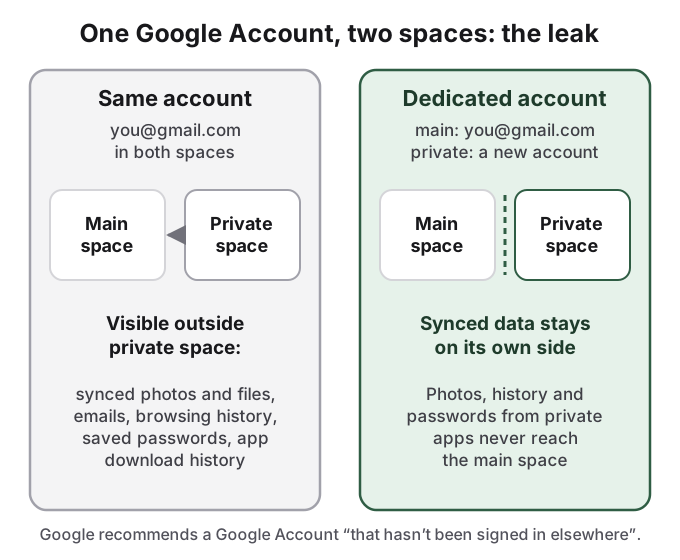
The profile walls off apps on the phone; a Google Account syncs everywhere. Google is explicit: if you sign in to Private Space with an account you use in your main space or on any other device, "synced photos, files, emails, contacts, calendar events", app download history, "browsing history, bookmarks, and saved passwords" become available outside it. Google Photos inside Private Space signed into your normal account shows your normal library, and anything you photograph in there backs up to the library everyone in your main space can open. Google recommends "a dedicated Google Account for your private space that hasn't been signed in elsewhere."
What Private Space cannot hide, in Google's own words
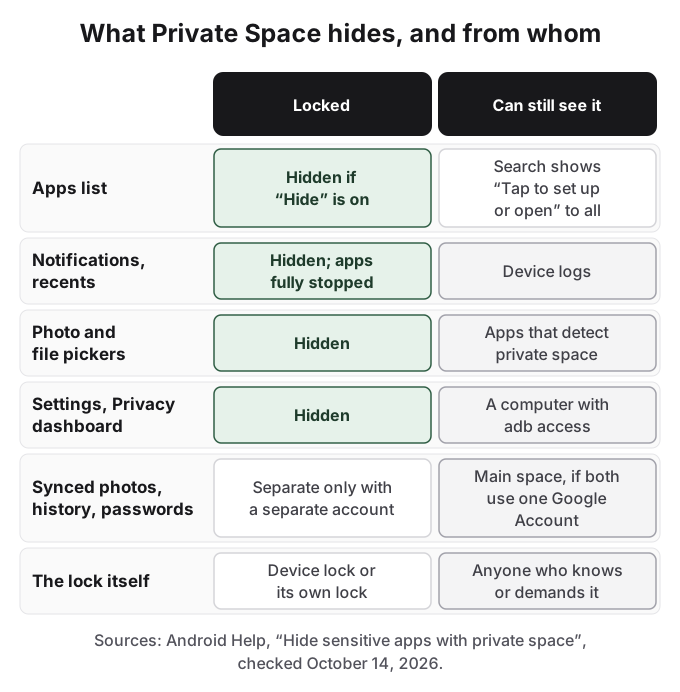
Google's help page does not oversell it. "In some cases, you can't hide the existence of private space from: Others who install apps on your phone; Others who can connect your device to a computer, including Android Debug Bridge (adb) access; Other apps which can detect the usage of private space and the apps within it; Device logs." Elsewhere on the same page: "it can be uncovered through computer access, which includes Android Debug Bridge (adb) commands, device logs, or by apps."
The human gap is bigger than the technical one. A Reddit user in r/GooglePixel asked how a space is hidden "if anyone can just type "private space" and coerce you to unlock it in the same way as the main account." The neutral search result helps, because it shows on every phone, but it does not help once someone knows the feature exists and asks you to open it. Several bank and wallet apps also refuse to run inside Private Space, and Google notes that Private Space apps bypass the phone's VPN.
Private Space does not survive a restore, and a lost lock means deleting it
Google: "when you restore the device from a device backup, private space won't be restored. Any on-device data for private space isn't backed up." Device backup of app data is on the list of things Private Space cannot do. Apps that keep their data on their own servers (a cloud drive, a chat app) can usually get it back when you sign in again on the new phone; photos and files stored only on the device inside Private Space cannot. A factory reset, a new phone or a restore from backup all start you with no Private Space.
There is no recovery for a forgotten lock either: "If you forget your private space unlock factor, you won't be able to access the space." The only way out is Settings > System > Reset options > Delete private space, which takes the phone PIN and deletes everything inside, or the delete option inside Private Space settings. In Google's words, "The app and its data are deleted with no backup."
How HideFile can help
Private Space is a good place for apps you want quiet and out of view. For photos and files, it combines two risks: the contents live on one phone with no device backup, and the space itself can be found by anyone with a computer, a detecting app or a reason to ask.
HideFile stores private photos and files inside an ordinary photo, video or PDF, called a cover file. In a gallery the cover looks like what it is. At hidefile.app, with your password, it opens your private files. Because the cover is a normal file, you can back it up to Google Drive or a computer and carry it to a new phone, so a reset does not take it with it. HideFile works in Chrome on Android today: open hidefile.app, choose a cover, add files, set a password and save. There is no Play Store app. Files are encrypted in the browser and not uploaded to a HideFile server.
The limits are the same kind Google states for Private Space. HideFile stops casual snooping, not forensic tools: a purpose-built tool can tell data was added to a cover, though it cannot read it without the password. There is no password recovery. For a trained examiner, a border search or legal pressure, neither tool is the right one.
See also how to hide photos on Android, hidden folders on Android and is a photo vault safe.
Sources
- Android Help: Hide sensitive apps with private space (checked October 14, 2026)
- Android Open Source Project: Private space
- Reddit r/GooglePixel: Private space is kinda useless? What do you use it for?
- Reddit r/GooglePixel: Hidden private space nonsense
- Reddit r/GooglePixel: Pixel Private Space vs. Samsung Secure Folder
- Hacker News: comment on using Private Space for social media and banking apps
- Hacker News: comment on Private Space and work profiles