
HideFile encrypts your files in the browser with a key made from your password, then stores the encrypted result inside an ordinary photo, PDF or video. Your files and your password are not sent to us. This page names the algorithms and parameters, lists exactly what the app does send, and is plain about the limits, including the ones a careful reader will hold against us.
Two ideas keep the rest of the page straight. Encryption is the security layer: without the password, the contents are unreadable. The cover file is camouflage: it changes what the encrypted bytes look like to someone browsing your files, and it does not make them invisible to someone examining them.
Your password becomes a key on your device
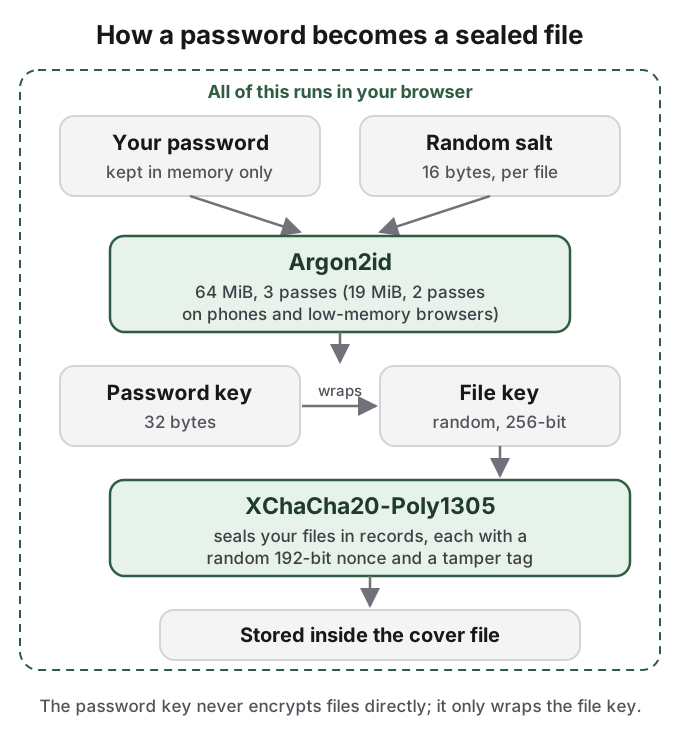
When you create a locked file, HideFile turns your password into a key with Argon2id (version 1.3), a memory-hard key derivation function. Memory-hard means each attempt costs a block of memory as well as time, so guessing stays slow even on hardware built for guessing.
The cost depends on where the file is created. In a desktop browser, Argon2id uses 64 MiB of memory and 3 iterations on a single lane. A browser that reports a phone or tablet, or 4 GB of memory or less, gets 19 MiB, 2 iterations and a single lane, because a phone browser cannot reliably spend 64 MiB per unlock without failing. That lower setting meets the OWASP minimum recommendation for Argon2id. The parameters are stored inside the locked file, so a file created on a desktop keeps its 64 MiB cost when you open it on a phone.
Each locked file gets a random 16-byte salt, stored with it. Two people who choose the same password still end up with different keys, so nobody can precompute one table of guesses and use it against every file.
Your files are sealed with XChaCha20-Poly1305
The key from your password does not encrypt your files directly. Each locked file has its own random 256-bit file key, generated on your device. The password key wraps that file key, and the file key seals your files.
The sealing uses XChaCha20-Poly1305, an authenticated cipher: it keeps the contents private and detects tampering. Files are stored as records, each with its own random 192-bit nonce and a Poly1305 authentication tag. If a record is altered, whether by a damaged copy or on purpose, unlocking it fails with an error rather than returning quietly wrong contents.
Both algorithms come from the open-source RustCrypto libraries (the argon2 and chacha20poly1305 crates). Our own core, written in Rust, uses them and runs in your browser compiled to WebAssembly. The same core runs everywhere HideFile runs, so there is one implementation to examine rather than one per platform.
Nothing you lock is uploaded
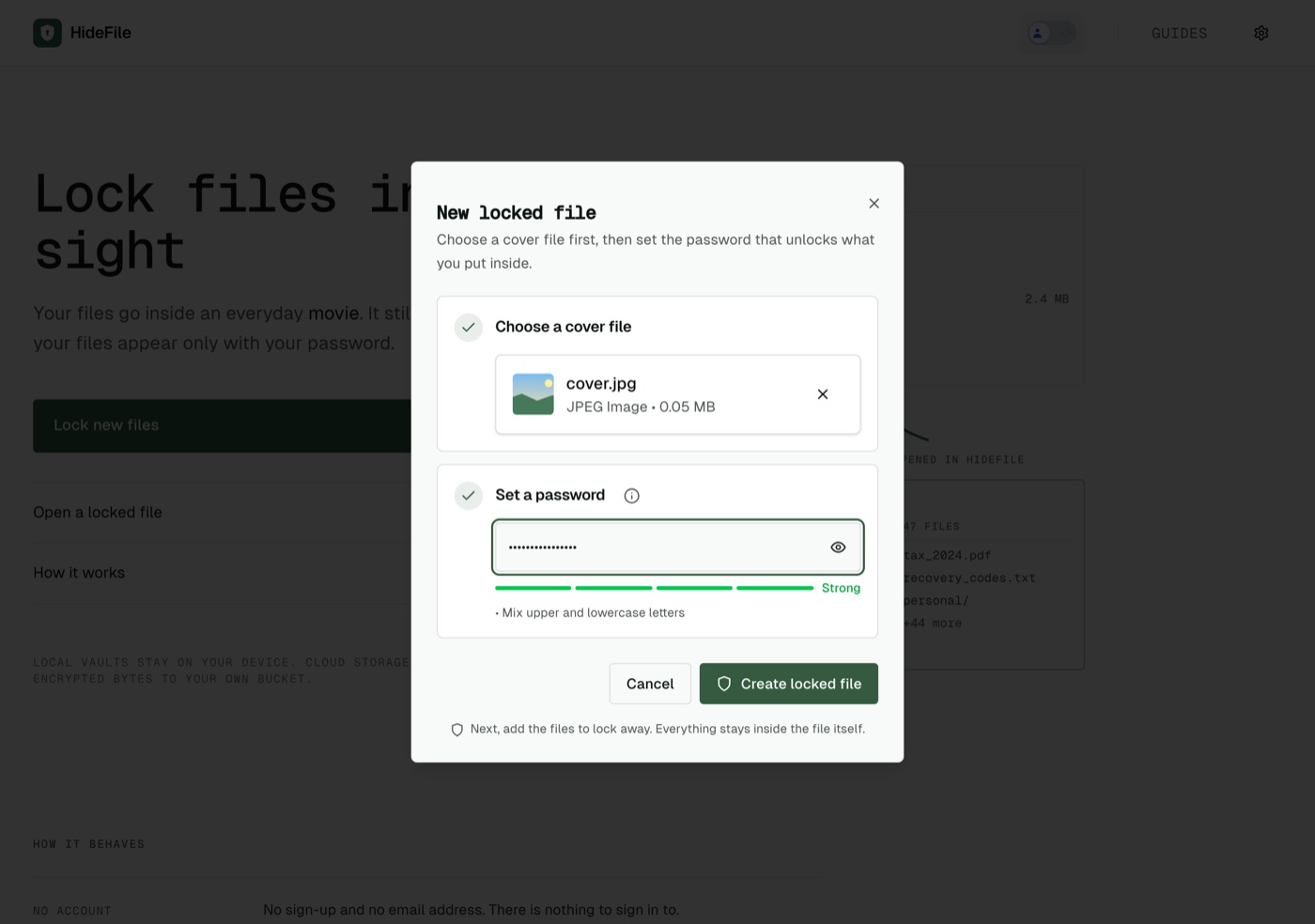
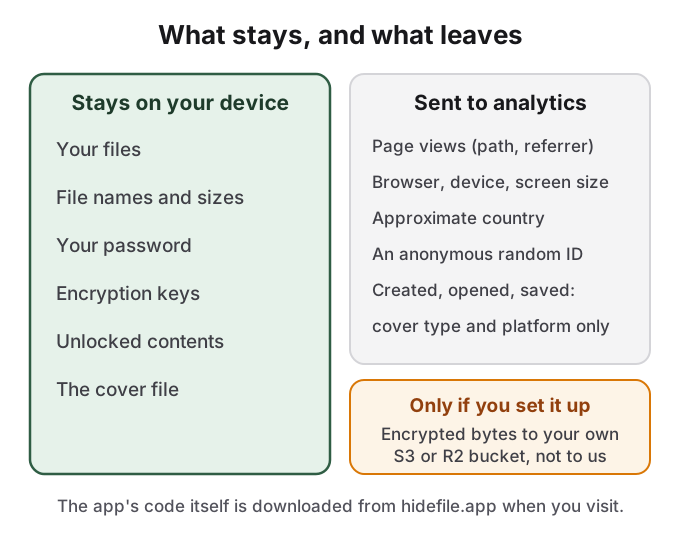
Locking, unlocking and saving all happen in the browser tab. Your files, their names, your password and the keys are not sent to a HideFile server, and there is no HideFile server that stores locked files. The one exception is a feature you switch on yourself: if you connect your own S3-compatible bucket, such as Cloudflare R2, the app sends encrypted bytes from your device straight to that bucket, not to us.
The app does keep some things in the browser on your device. To make reopening fast, it stores a copy of the last locked file you opened, still encrypted, for up to a day and up to 100 MB. Files you save for reuse and the working copy of an open file live in the browser's private file storage. It also remembers settings such as theme and view, and the name, size and time of the last ten covers you opened, never the password. Clearing the site's data removes all of it. On a shared or borrowed computer, do that when you finish.
The analytics we send carry no file data
We use PostHog to count usage, with autocapture turned off, so clicks and page contents are not recorded. What is sent:
- Page views: the page path and the referring URL, your browser and device type, and screen size.
- An approximate country, which PostHog derives from your IP address when the request arrives.
- An anonymous random identifier kept in your browser, to count repeat visits.
- Three events,
locked_file_created,locked_file_openedandlocked_file_saved, each carrying only the cover type (png, jpeg, mp4 or pdf) and the platform (web or native).
File names, sizes, counts, paths, passwords, keys, contents and error messages are not sent. A content blocker such as uBlock Origin blocks the analytics and the app works the same. You can check this yourself: open your browser's developer tools, watch the Network tab while you lock and save a file, and look for any request carrying your files. The privacy policy is the binding version of this list.
The threat model, stated as people
| Who | Result | Why |
|---|---|---|
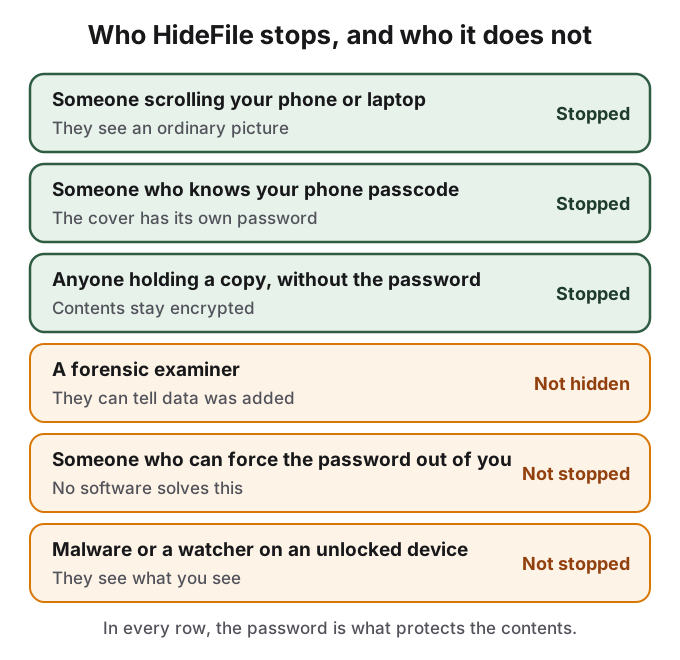
| Someone scrolling your phone, laptop or cloud drive | Stopped | They see an ordinary photo, PDF or video, and nothing named like a vault |
| Someone who knows your phone passcode | Stopped | The cover has its own password, separate from the device lock |
| Anyone with a copy of the cover but not the password | Stopped | The contents stay encrypted |
| A forensic examiner, or anyone who knows HideFile and checks closely | Not hidden | They can tell data was added; the contents stay encrypted |
| Someone who can force you to give up the password | Not stopped | No software solves this |
| Malware, screen recording or a watcher on an unlocked device | Not stopped | While files are open, they see what you see |
A forensic tool can tell that data was added
HideFile does not try to conceal from a forensic check that data is present, and does not claim to. Your encrypted records sit inside the cover's own file structure, where a normal viewer ignores them. A purpose-built tool, or an examiner who knows what to look for, can identify that records were added. File size is a simpler tell: a short holiday snapshot carrying several gigabytes is unusual, and comparing the cover against the untouched original shows the difference at once.
What the examiner gets is the fact that something is there, not the contents. Without the password the records stay sealed. That is the honest boundary: plain sight answers a curious person and an ordinary search, not a determined examiner with your device in hand. It is the wrong tool for border searches, trained examiners or legal pressure.
Tamper detection covers the sealed records, not every byte of the cover. An app that re-saves, strips metadata from or recompresses the cover can change the picture without any alarm from the encryption, and it can strip the records entirely, which destroys the files inside. Keep the cover as a file.
There is no password recovery
We do not hold your password and cannot derive it from a locked file. There is no reset link, no recovery code and no support process that can open a file. If the password is lost, the files inside are lost. That is a property of the design, and the reason anyone who holds a copy of your cover cannot simply ask us to open it.
What is not open source and not audited
The HideFile source code is not public, and no independent firm has audited it. The algorithms are standard, the libraries that implement them are open source, and this page and the in-app security page give the parameters, but our code that calls them cannot be read by outsiders today.
That matters. A Hacker News commenter, reacting to another closed tool that hides data in a photo, put it in four words: "no source code == no security." Others in that community point out that a web app is delivered fresh from the server on each visit, so even published source would need a way to confirm that the code you run matches it. Both points are fair, and for a reader who holds that standard, HideFile does not meet it yet. We would rather say so than argue. If you find a flaw, email [email protected] with steps to reproduce it and give us reasonable time to ship a fix before publishing.
Sources
- HideFile: How HideFile protects you
- HideFile: Privacy Policy
- OWASP: Password Storage Cheat Sheet
- RFC 9106: Argon2 Memory-Hard Function for Password Hashing and Proof-of-Work Applications
- RustCrypto: argon2 crate and chacha20poly1305 crate
- Hacker News: Show HN: a hardware-bound local password vault hidden in a photo, comment 49509561
- Hacker News: comment on browser delivery of encrypted apps