# Using HideFile responsibly: what it is for, and what it is not
HideFile is for keeping your own private files out of casual view: on a phone someone else picks up, a laptop the family shares, or a cloud drive other people can browse. It encrypts files with a password and stores them inside an ordinary photo, PDF or video. This page sets out where that is the right tool, where it is the wrong one, and the rules that apply either way.
## Ordinary privacy is the main use
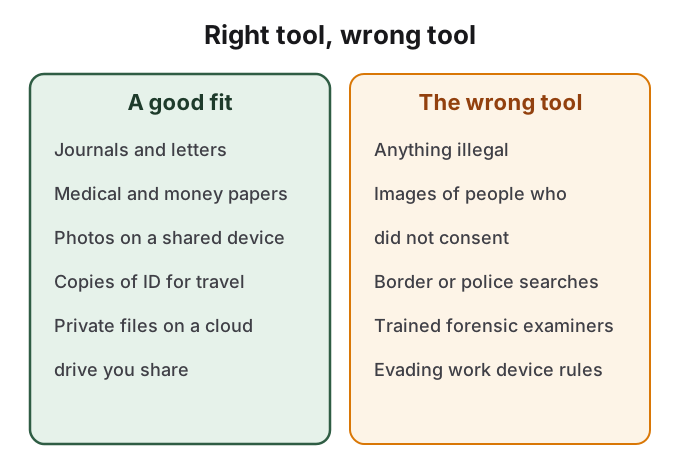
Most people who look for a way to hide files are not hiding anything sinister. They want a diary that a sibling will not read, scans of a passport and bank letters that do not sit in the camera roll next to holiday photos, medical results they have not told anyone about yet, or photos from a relationship that are nobody else's business. A shared tablet, a phone handed to a child to play a game, or a laptop lent to a colleague is enough to make that a real problem.
Some uses carry higher stakes. Someone planning to leave a controlling relationship may need to keep documents, evidence or a plan where a partner who checks their phone will not find them. HideFile runs in a browser, and the browser history will show the visit, which matters in this situation. A cover file with its own password, separate from the phone's passcode, fits that situation better than a hidden album the partner can open with the same passcode. If that is your situation, local domestic violence services can help you plan for safety, including digital safety, and their advice should come before any app.
The same tool fits ordinary privacy well and high-pressure situations badly.
## What HideFile is not for
Our [Terms of Service](https://hidefile.app/terms) allow HideFile to be used only for lawful purposes. You may not use it to break the law, to infringe other people's rights, or to store, lock or send illegal content. You are responsible for what you lock and for following the law where you live.
Two cases deserve to be named. Images of another person that were taken or kept without their consent are not "private files" in any sense that matters; the privacy at stake is theirs. Sexual images of anyone under 18 are illegal to possess almost everywhere, whatever tool holds them. Encryption does not change what the law says about the content.
Work and school devices are a different kind of limit. A device your employer or school manages often runs monitoring software, and its rules usually forbid hiding data on it. Keep personal files off managed devices rather than hiding them there.
## HideFile stops casual snooping, not forensic tools
It is worth being exact about the protection, because overestimating it is the most dangerous mistake. Someone scrolling your files sees an ordinary picture. A purpose-built forensic tool, or someone who knows HideFile and examines the cover closely, can tell that data was added. They cannot read the contents without the password, but they can tell something is there.
That makes HideFile the wrong tool for border searches, trained examiners, police or legal pressure. In those situations the question is often not whether data is hidden but whether you can be made to unlock it, and no software answers that. A Hacker News discussion about preparing for border device searches reached the same conclusion: strong encryption "will be useless once they trick or intimidate you into giving up your passwords." If you face that kind of risk, get advice from a lawyer or a digital-security organisation, and carry less data.
## No recovery means you carry the responsibility
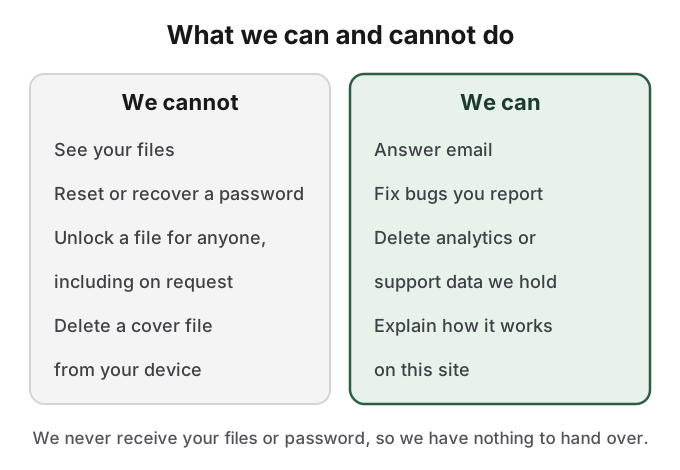
We never receive your files or your password. That is what keeps them private, and it has a direct cost: there is no password reset, no recovery and no one to ask. Forget the password and the files are gone. Lose the only copy of the cover file, or send it through an app that re-saves the picture and strips the hidden part, and the files are gone too.
We hold no files and no passwords, so there is nothing for us to open or hand over.
The same fact sets limits on what we can do for anyone else. We cannot unlock a file for a worried parent, a partner, an employer or an investigator, because we do not have the key. What we do hold is listed in our [privacy policy](https://hidefile.app/privacy): anonymous analytics, and support emails if you write to us.
## A short legal note
Laws on encryption, on carrying encrypted data across borders and on being required to disclose passwords differ from country to country. Some places can compel you to unlock a device or a file; refusing can carry its own penalty. This page is not legal advice. If the legal position matters to you, check it for your country before you rely on any privacy tool, this one included.
For how the protection works in detail, see [HideFile security](/guides/security). For how it compares with the built-in options on your phone, see [how HideFile compares](/guides/compare).
## Sources
- HideFile: [Terms of Service](https://hidefile.app/terms), section 5, Acceptable use
- HideFile: [Privacy Policy](https://hidefile.app/privacy)
- HideFile: [How HideFile protects you](https://hidefile.app/security)
- Hacker News: [Ask HN: how do you prepare for gadget border searches?](https://news.ycombinator.com/item?id=43564550), comment [43566094](https://news.ycombinator.com/item?id=43566094)
- EFF: [Digital Privacy at the U.S. Border](https://www.eff.org/wp/digital-privacy-us-border-2017)